
Artwork preparation
Not all graphics are created equal. A common mistake is using graphics made for a web page in a print job. Three things matter: resolution, color mode, and how spot (Pantone) colors are handled.
Resolution
Web graphics (JPG, PNG, TIFF, GIF or BMP) are made for screens, which show about 72 pixels per inch. For good print quality, an image needs 300 dots per inch at the size it prints. Enlarging makes it worse:

Start with an image of 300 dpi or more and reduce it in Photoshop or a similar app so it’s 300 dpi at the size it will print. More than 300 dpi isn’t needed, except for black-and-white bitmap images with no grays. Grayscale images look best at 150 dpi.
Avoid enlarging images. If you have no choice, enlarge in a graphics app, which fills in the missing pixels as well as it can. The result is never as good as a high-resolution original; 200 dpi at the final size is the minimum, and you’ll still see some loss.
Vector graphics
Vector graphics can be resized as much as you like with no loss of quality. They come from apps like Adobe Illustrator and usually end in .ai or .eps. Check that a vector file doesn’t contain low-resolution images inside it. Vector art is required for multi-color spot color printing.
Never use GIF files. They are low resolution and don’t hold enough color information to print accurately.
CMYK, RGB and spot color
RGB is how screens make color, by mixing red, green and blue light. CMYK is how presses make color, by mixing cyan, magenta, yellow and black ink. Every offset and digital press prints CMYK.
RGB can show colors CMYK can’t reproduce, so converting RGB to CMYK can change some colors. Most prepress systems convert automatically, but it’s better to convert in Photoshop yourself and check the result before thousands of pieces are printed.
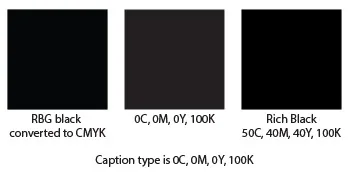
Black is the clearest example. RGB black converts to roughly 75% cyan, 68% magenta, 67% yellow and 90% black: 300% ink coverage that takes a long time to dry. Black text should be 0/0/0/100. Large black areas printed 0/0/0/100 look a little gray, so we use a rich black, most commonly 50% cyan, 40% magenta, 40% yellow and 100% black.
Spot (Pantone) color
Spot color prints each color with its own premixed ink, like buying a can of pink paint for a pink wall. We mix inks to the Pantone Matching System formula, so it’s the best choice when a color must match exactly, as in logos. It suits one- and two-color jobs; it isn’t practical for full-color images. Spot color artwork must be vector, made in an app like Illustrator.